Website migration completed successfully.
The SSL certificate was active.
The website was loading perfectly.
Outgoing emails from Zoho Mail were working.
Yet, every email sent from Gmail simply refused to arrive.
At first glance, it looked like a Zoho Mail problem.
It wasn’t.
After several hours of DNS investigation, record verification, and systematic troubleshooting, I discovered that the real issue had nothing to do with Zoho Mail itself. The root cause was hidden inside the DNS configuration after changing the domain’s nameservers.
This article documents the complete recovery process so that anyone migrating a website to Hostinger while using Zoho Mail can avoid the same mistake.
Project Overview
| Component | Platform |
|---|---|
| Domain | clonegallery.in |
| Website Hosting | Hostinger |
| Email Service | Zoho Mail |
| DNS Management | Hostinger DNS |
| Migration Type | Nameserver Change |
Background
I migrated my website to Hostinger and updated the domain nameservers to point to Hostinger.
The website migration itself was completely successful.
- Website was accessible
- SSL certificate was working
- WordPress loaded normally
Everything appeared healthy.
However, shortly afterwards I noticed that incoming emails had stopped working.
The Symptoms
The behavior was surprisingly confusing.
- ✅ Website worked normally.
- ✅ Zoho Mail could send emails.
- ❌ Gmail messages never arrived.
- ❌ Incoming mail failed even though the mailbox existed.
- ✅ Zoho domain verification completed successfully.
Because outgoing mail worked, it was easy to assume that the email configuration was correct.
It wasn’t.
The First Error
While testing, Gmail returned the following message:
554 5.7.1 Relay Access Denied
Initially this error suggested a mail server issue.
After further investigation, it became clear that the real problem was related to incomplete DNS configuration following the nameserver migration.
Investigation Timeline
Instead of randomly changing DNS records, I followed a structured verification process.
Phase 1 – MX Records
The first step was verifying whether the domain was pointing mail delivery to Zoho.
The required MX records were:
- mx.zoho.in
- mx2.zoho.in
- mx3.zoho.in
Everything looked correct.
So the problem was somewhere else.
Phase 2 – SPF Records
Zoho immediately detected another issue.
The domain contained multiple SPF records.
Current SPF:
v=spf1 include:_spf.mail.hostinger.com ~all
Zoho recommended:
v=spf1 include:zoho.in ~all
Instead of creating two separate SPF records, I merged them into a single valid record:
v=spf1 include:zoho.in include:_spf.mail.hostinger.com ~all
After updating the record:
✅ SPF verification passed.
Phase 3 – DKIM
Next I generated a DKIM selector inside Zoho Mail.
zmail._domainkey
After adding the TXT record to Hostinger DNS, DKIM verification completed successfully.
Phase 4 – DMARC
The existing DMARC policy was retained for monitoring.
v=DMARC1; p=none
This allowed mail authentication reports without rejecting messages during testing.
Phase 5 – DNS Audit
At this point I compared every DNS record between Hostinger and Zoho.
I verified:
- MX
- SPF
- DKIM
- Verification TXT
- DMARC
Everything matched Zoho’s requirements.
Phase 6 – Mailbox Verification
I also confirmed that every mailbox actually existed.
The following accounts were active:
Since the users already existed, the problem wasn’t related to mailbox creation.
Phase 7 – DNS Cleanup
While reviewing the DNS zone, I noticed several records left over from Hostinger’s email service.
These included mail-related records such as:
- Hostinger DKIM
- autodiscover
- autoconfig
Since Zoho Mail was the only email provider being used, these unnecessary records were removed.
Only the records required for:
- Website hosting
- Zoho Mail
were retained.
Keeping the DNS zone clean reduced potential conflicts and made future troubleshooting much easier.
The Final Test
Once the DNS changes had propagated, I repeated the tests.
Test 1
Zoho → Gmail
✅ Delivered successfully.
Test 2
Gmail → Zoho
This had previously failed.
Now…
✅ Incoming email arrived successfully.
The issue was finally resolved.
Root Cause Analysis
This was not a Zoho Mail outage.
It was not a mailbox problem.
It was not a Hostinger hosting issue.
The real cause was the DNS migration itself.
Changing nameservers transfers DNS management—not the DNS records.
When the nameservers were moved to Hostinger, every email-related DNS record had to be recreated manually.
Although the website became operational immediately, the email infrastructure remained incomplete until:
- MX records were verified
- SPF was corrected
- DKIM was configured
- DMARC was confirmed
- unnecessary legacy mail records were removed
- DNS propagation completed
Only then did inbound mail begin working again.
Final DNS Architecture
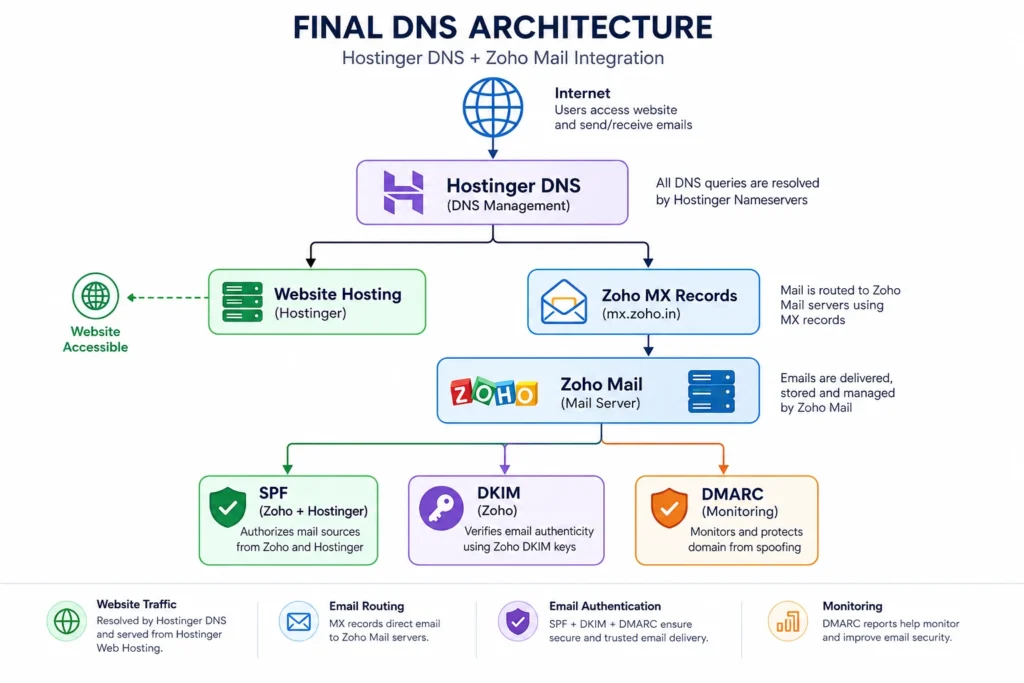
Final DNS Checklist
| Record | Status |
|---|---|
| MX | ✅ |
| SPF | ✅ |
| DKIM | ✅ |
| DMARC | ✅ |
| Zoho Verification TXT | ✅ |
Lessons Learned
This troubleshooting session reinforced several important engineering lessons.
1. Website migration and email migration are two different tasks.
A working website does not mean your email infrastructure is correctly configured.
2. Changing nameservers never copies your old DNS records automatically.
Every essential email record must be recreated in the new DNS zone.
3. Never create multiple SPF records.
If multiple services need authorization, merge them into a single SPF record.
4. Always verify MX, SPF, DKIM, and DMARC immediately after migration.
Waiting until users stop receiving email can create unnecessary downtime.
5. Test both directions of email delivery.
Many administrators only test outgoing mail.
Always test:
- Outgoing (Zoho → Gmail)
- Incoming (Gmail → Zoho)
Both must work before considering the migration complete.
6. DNS propagation requires patience.
Even after the correct records are added, global DNS caches may take time to update.
Making unnecessary changes during propagation often creates additional confusion.
Final Thoughts
This incident was a valuable reminder that successful website migration is only half the job.
Email authentication, DNS records, and mail routing require the same level of attention as the website itself.
By documenting the investigation instead of simply listing configuration steps, I hope this case study helps others avoid hours of unnecessary troubleshooting after changing nameservers.
If you’re planning a Hostinger migration while using Zoho Mail, verify your DNS records before assuming the migration is complete. It could save you from the exact issue I experienced.